

Jacob2195
Member
Iv'e seen a lot of new users who dont know how to add pictures to their thread, so I decided to make this thread to get you guys started! Hope this helps.
1. Take a picture of your item(s), try to make sure there clear and not to big.
2. Download them to your computer
3. Upload them to Flickr, Photobucket Ect.
4. Then make a new thread on SR, or Edit Your Thread
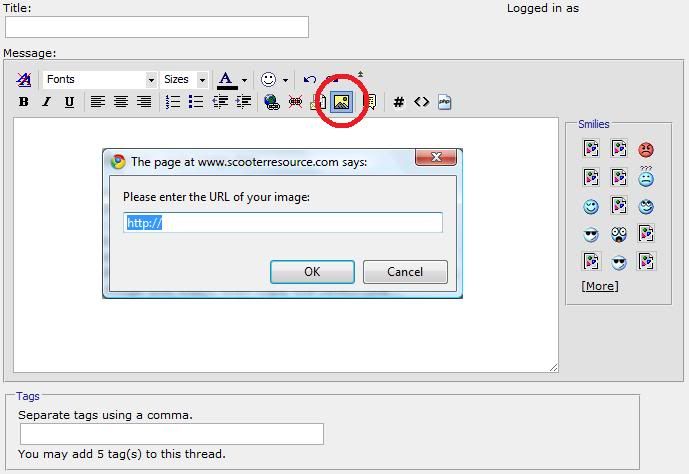
5. Then click the Yellow square button on the SR toolbar
6. Paste the code in the box and click "ok"
7. Submit your thread!
1. Take a picture of your item(s), try to make sure there clear and not to big.
2. Download them to your computer
3. Upload them to Flickr, Photobucket Ect.
- Open a new tab/window, go to Flickr, Photobucket Ect.
- Log-in to your account.
- Click "Upload" then click "Select images and videos"
- Select the image(s) you want to upload, and click done.
- Wait for them to finish uploading then go to the album you added them to
- Click the image you want, then copy the Direct Link
4. Then make a new thread on SR, or Edit Your Thread
5. Then click the Yellow square button on the SR toolbar
6. Paste the code in the box and click "ok"
7. Submit your thread!